¶ Re-Enroll Summary
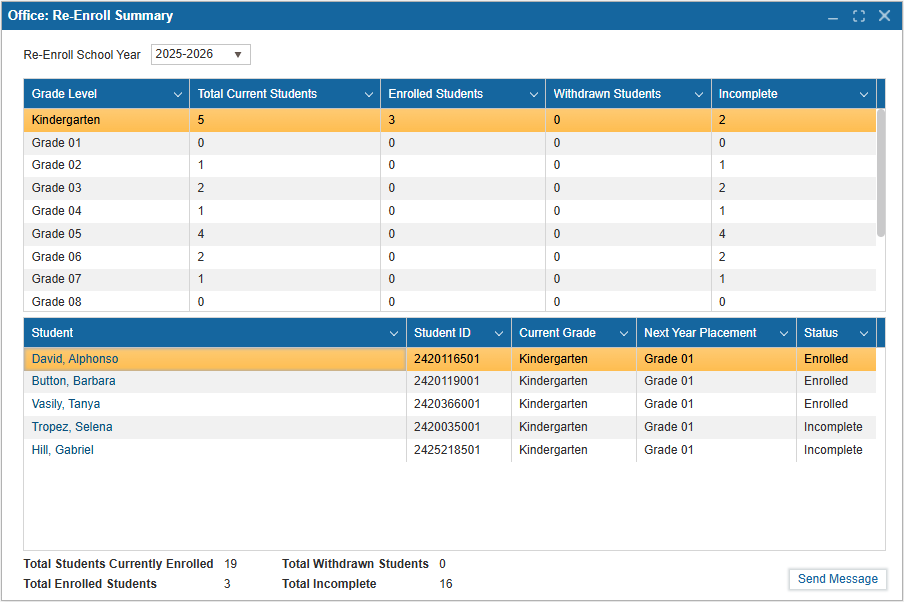
The Re-Enroll Summary feature is available in the Admin Portal under the Office module. It can be used to view the enrollment status of all students and grades for the upcoming school year when the Re-Enroll feature is used. This summary also provides an overview of the current student count and how many students are enrolled for the following year.
-
Navigate to Office: Re-Enroll Summary. The school year will default to the upcoming year.
-
The first table includes a count of Total Current Students, Enrolled Students (for next year), Withdrawn Students, and Incomplete for each grade offered by the school. This grade list is determined by those checked in Administration: Setup Re-Enroll.
-
The second table includes each student in the selected grade level. It displays the Student Name, ID, Current Grade, Next Year Placement, and Status. Re-enroll status includes Incomplete, Enrolled, and Withdrawn. Selecting the student's name will also open their profile automatically.
-
Below the tables are counts of Total Students Currently Enrolled, Total Withdrawn Students, Total Enrolled Students, Total Incomplete for the entire school.
- Total Students Currently Enrolled: The number of students enrolled in the current year.
- Total Withdrawn Students: The number of students who responded "No" in Re-Enroll.
- Total Enrolled Students: The number of students who responded "Next Year" or "Yes" in Re-Enroll.
- Total Incomplete: The number of student who have not responded.
- Click Send Message to notify the parents/guardians of students whose status is Incomplete. A pop up will appear with a count of how many emails were sent successfully, and how many failed.
Note: When a student is re-enrolled, it does not mean that an enrollment record is created automatically. If a student is re-enrolled, an enrollment record will be created once Year End Rollover is completed.