¶ Withdraw and Delete
¶ Overview
The Withdraw and Delete feature in the Student module is used to identify students who are withdrawing, transferring, or graduating from the current school year. The feature is only to be used by Admin users of the school.
¶ To Withdraw a Student:
-
Select Withdraw and Delete feature.
-
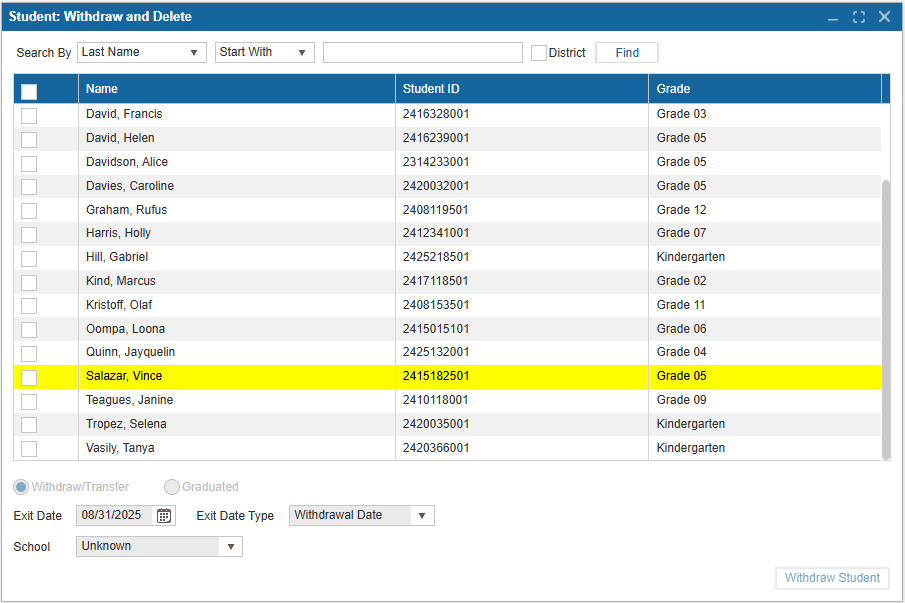
Select Find to populate the table with students in your school. A district user will be able to select the District checkbox to see students from all schools in the district.
-
You may also search by Last Name, First Name, Grade Level, Enrollment Status, Phone Number, or Status.
-
The table will populate with the First and Last Name of the students, Student ID, and current Grade.
-
Select a checkbox next to the student's name to enable the options below the table.
-
Select Withdraw/Transfer or Graduated.
-
If Withdraw/Transfer is selected, select the Exit Date, Exit Date Type (Withdrawal or Completion) and School.
-
If Graduated is selected, only the Exit Date needs to be provided. It will default to the last day of school as set in Initial Setup.
-
Select Withdraw Student to save your changes and Escape to cancel them.
-
A pop up will appear to confirm the changes, select Yes or No.
-
Once a student is Withdrawn they will be highlighted in yellow.
If a student has Outstanding Fees, they will not be able to Withdraw or Graduate until these are resolved in Fees.