¶ Student- Course Request
¶ Student POV
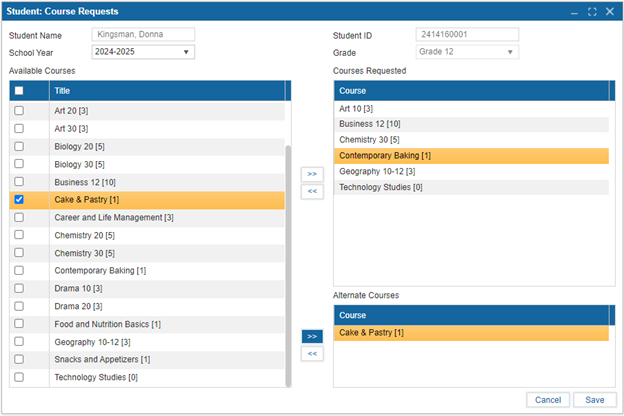
To submit their course requests, students must be enrolled for the current academic year. The Course Requests feature in the student portal allows students to submit these requests. The process is as follows:
- Select Academic Year: Choose the relevant academic year.
- View Available Courses: Browse the list of courses offered.
- Select Courses: Use the checkbox selector to choose the desired courses.
- Submit Requests:
- Click the " >> " button to submit the selected courses.
- Click "Save" to confirm the submission.
¶ Reversing Course Requests
If a student wishes to reverse a selected course request while its status is still pending:
- Use the " << " button.
Once a course request's status changes to "Approved" or "Denied", it can no longer be reversed unless admin user reverses this.
¶ Admin POV
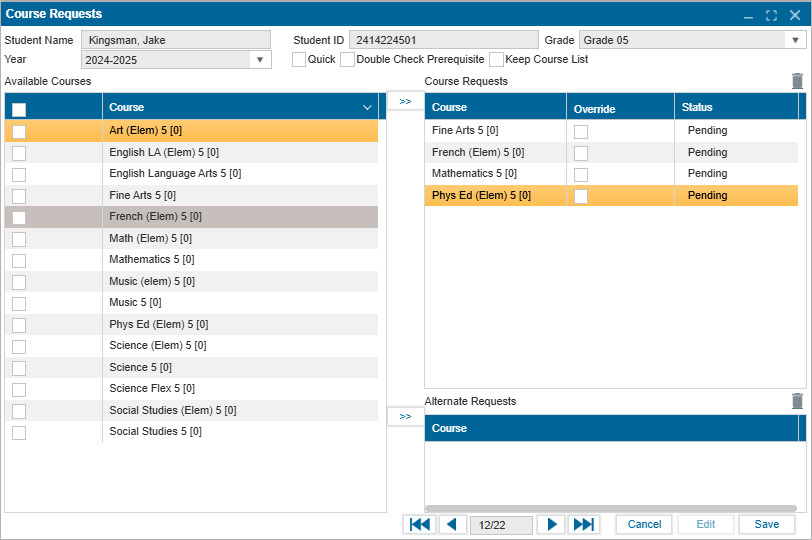
After students submit their course request via the student portal, the requests are submitted and retrieved from Student: Course Request on the Admin portal.
- The documents will be in a “Pending” state until an action is performed on each student’s request.
- In Edit mode, override checkbox can be used to bypass the system if there is a pending requirement that the course needs.
- Admin can also use this screen to submit a course request on behalf of a student.
- Approval or denial actions performed in Setup: Course Catalog is updated accordingly on this screen.
Version: 252 Updated: February 4, 2025