¶ New
¶ General Info
The New feature in the Staff module is used to create a new staff member and provide them an ISMS profile. This module is visible on the Admin Portal but the New feature is only available to school administrators, therefore, only school administrators may create a new staff.
¶ Create a New Staff User
-
Select New feature.
-
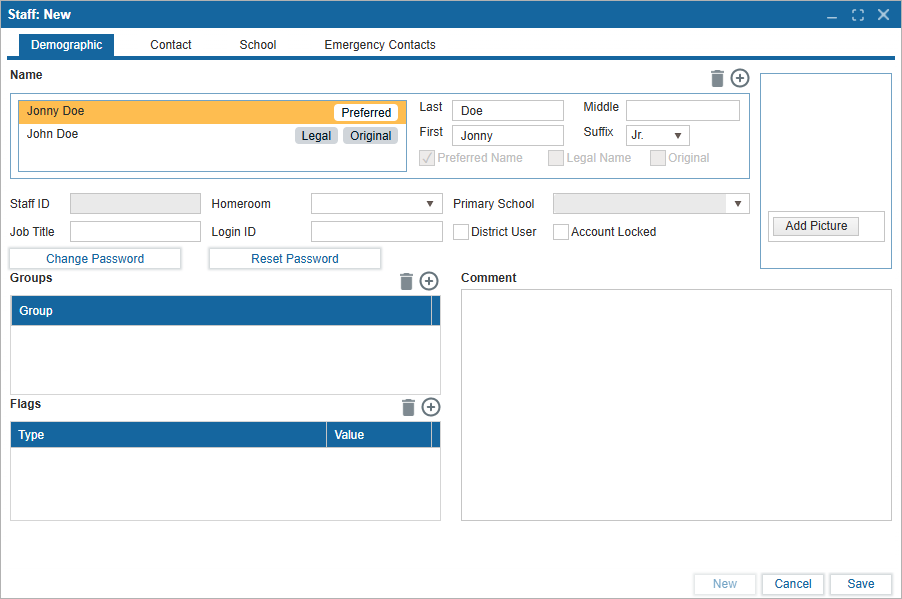
There are 4 main subtabs under New:
- Demographic
- Contact
- School
- Emergency Contacts
- Demographic includes essential fields required to build a Profile.
- Enter a First Name and Last Name. You may also enter a middle name and suffix.
- Use the (+) icon to add second name for the user. For example, a Preferred Name or nickname.
- Select District User using the checkbox to them additional permissions.
- Select Account Locked using the checkbox to lock the account.
- Optional: include a Homeroom if relevant to the staff
- Optional: include a Job Title if relevant to the staff
- Optional: create a custom Login ID. The default will be FirstName.LastName.
- Comments can be added in the textbox.
- Assign the user a Group using the dropdown if relevant. This dropdown is populated from Setup: Parameters 1 under Staff Group Type.
- Assign the user a Flag using the dropdown if relevant. This dropdown is populated from Setup: Parameters 1 under Flag for Staff.
- Add Picture can be used to upload an image as an avatar for the user.
-
Contact includes fields for Phone Numbers, Addresses, and Emails. Use the (+) icon to add records and the trash icon to delete them.
-
School includes fields for date of birth, start and end dates, professional IDs, and salary.
-
You may also record previous schools the staff taught at using the (+) icon above the table. Similarly, a Role can be added to quickly configure security permissions.
-
Emergency Contacts allows for additional contacts to be added. Select New Contact to enter their information.
-
Select Cancel at any point to discard the profile before saving.
-
Select Save to save the profile.
-
To edit any fields at another time, navigate to Staff: Profile and select Edit.
Once a profile is created, provide a Login ID and temporary password to the user. They can then login to their account and update the Login ID and Password independently.
To ensure the staff member has access to the Admin Portal, verify that an appropriate Role is assigned.