¶ Delete
¶ General Info
The Delete feature found in the Staff module is available in the Admin Portal for users/roles who have been granted access in Administration: Security. It is used to delete a profile from the school and the ISMS System.
¶ Delete a Staff Account
-
Select Delete feature
-
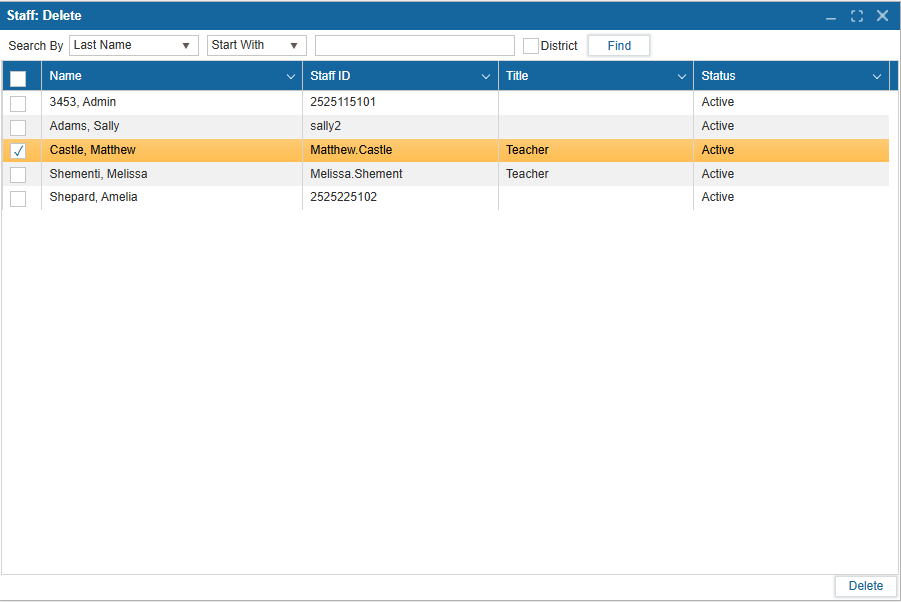
Select Find to view a list of all staff in the school. To search for a specific user, you may use the filters to search by Last Name, First Name, Status, or Phone Number.
-
Select the District textbox if you are a district user and are interested in searching all staff in all district school.
-
A table will populate with Name, Staff ID, Title, and Status.
-
Select the user you would like to delete using the checkbox.
-
A confirmation window will appear asking you if you would like to delete the staff member from the system.
-
Select Yes to delete and No to cancel.
The deleted staff member will not appear in the Staff search in the system and will no longer have a valid account to log into.