¶ Security 🔐
Security in the ISMS is different for the Admin Portal and the Public Portal.
User access and configuration of permissions begin here in Security feature. District users may create new Admin and Teacher roles or edit prior roles and configure levels of access and permissions. While Admin portal security is role-based, the public portal security settings for students and parent/guardians is not. In a role-based security system, roles are first created and then assigned to staff with an available profile. Most changes to the ISMS security – including creating, editing, and assigning roles – are made from the Administration: Security feature.
Roles in the ISMS have three key attributes:
- 🔢 Security level (ranges from 1-100)
- 🧩 Admin vs Teacher employer groups
- 📂 Access to a set of features and/or functionality within the system.
Users can have one to many roles.
-
Security Level: Determines which roles a particular role is allowed to edit. For example, if Role A has a security level of 90 and Role B has a security level of 65, then users assigned Role A can edit the permissions of Role B, but not vice versa. Staff must be assigned to a security role before they can log in.
-
Admin vs Teacher: The choice between these two employer groups depends on the desired scope of responsibilities and access to features, functionality, and school-wide data.
- Admin users have more modules and features available to configure access permissions for depending on the scope of their administrative or leadership role.
- Teacher users have the necessary modules and features available to configure access permissions specifically for teaching instruction and classroom management.
- Another differences is functionality within features. As an example, in the Office Attendance feature, Admin user must click Edit before changing attendance statuses and can modify attendance for past, present, and future days. On the other hand, a Teacher user can directly submit attendance for the current day without clicking Edit, and cannot modify past or future days' attendance.
- Additionally, Teacher roles include a column called View All in School (more details below).
Security roles can be assigned in both the Administration: Security feature and the Roles table in Staff: Profile: School Tab
¶ Feature and Tab Access 🧷
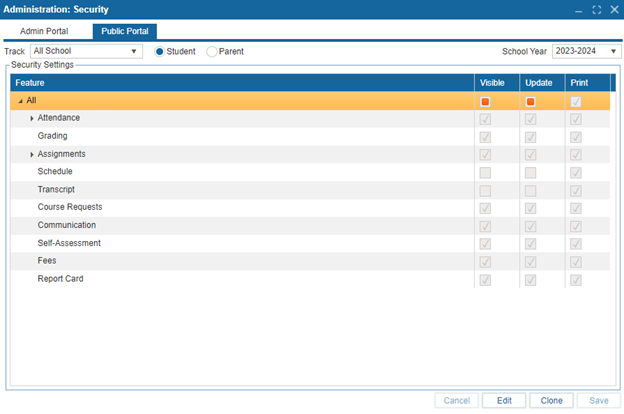
Feature (and tab) access is controlled by a comprehensive list of ISMS features. Each feature has six checkboxes to manage access:
- ✏️ Update – Allows the user to edit existing records.
- ➕ Add – Allows the user to add new records.
- 🗑️ Delete – Allows the user to delete records.
- 👁️ Visible – Makes the feature visible to the user (new features are often unchecked by default).
- 🖨️ Print – Allows the user to print preview reports from the feature.
- 🏫 View All in School (only available to Teacher roles) – If checked, the user has access to all teacher and student data. If unchecked, the user can only access the classes and students they are teaching.
Note: Security can also be adjusted at the tab level within each feature for more granular control.
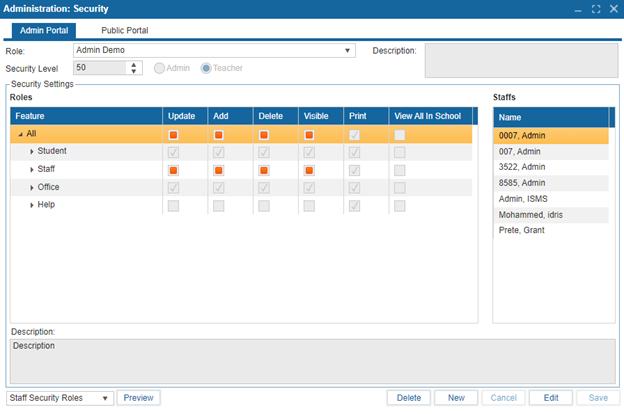
Public portal security is not role-based, and changes made will apply equally to all users. Public portal security can be set separately for parents and students, and is divided based on the track that the student is in. Additionally, public portal security depends on the school year, allowing admins to archive student data after a certain period.
Similar to the admin portal security, public portal security includes a list of features for which access can be controlled. Each feature has three checkboxes:
- 👁️ Visible – Makes the feature visible to the user.
- ✏️ Update – Allows the user to edit existing records.
- 🖨️ Print – Allows the user to print preview reports from the feature.