¶ Staff Academic
This is the repository that holds staff academic information.
This feature has 3 main tabs. Click the tabs below to see the quick guide/instructions:
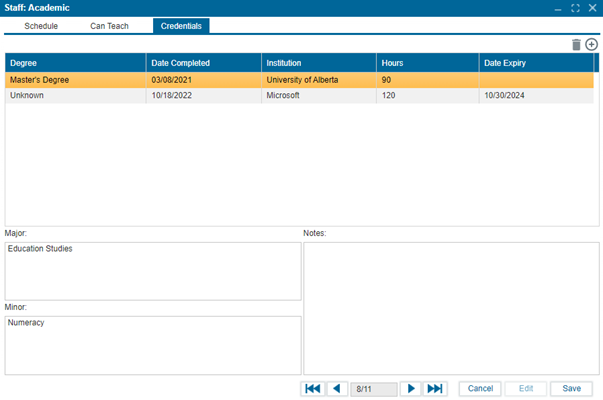
This tab is a view-only tab and displays the schedule of the selected staff member.
To see the class schedule for a staff member:
- Search for and select the staff member from the staff list results.
- Navigate to Staff > Academic to access the academic section for the selected staff member.
- Click on the Schedule tab to view the staff member's class schedule.
- Use the School Year, Term, and Track fields to refine your search and locate the specific schedule you are interested in.
- Click Preview to either save the schedule as a PDF or print it.
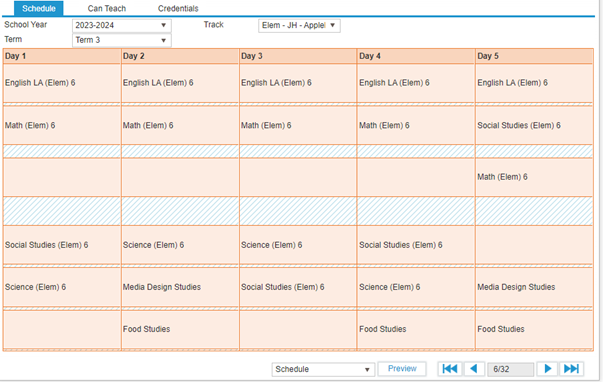
The Can Teach feature provides a quick overview of the courses a staff member is qualified to teach, which is essential for creating teacher schedules.
To assign courses a teacher is qualified to teach:
- Search for and select the staff member from the staff list.
- Navigate to Staff > Academic to access the academic section for the selected staff member.
- Click on the Can Teach tab to view or assign courses.
- Click Edit and use the checkboxes to select the courses the staff member can teach.
- To add comments about the courses, use the Comments field on the right side of the screen.
- Click Save to confirm your changes.
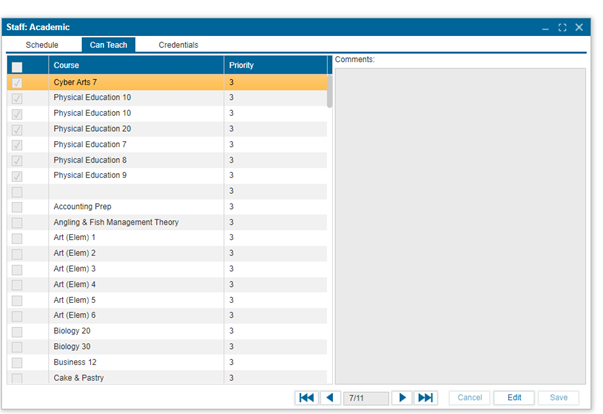
The Credentials tab allows users to maintain the details of staff qualifications and credentials.
To add a credential to the staff academic feature:
-
Search for and select the staff member from the staff list.
-
Navigate to Staff > Academic to access the academic section for the selected staff member.
-
Click on the Credentials tab.
-
Click Edit.
-
Click the + button to add a new credential.
5.1. Degree: Enter the degree completed (e.g., Bachelors, Masters).
5.2. Date Completed: Enter the date the staff member completed the degree.
5.3. Institution: Enter the institution where the degree was obtained.
5.4. Hours: Enter the total number of hours it took to complete the degree.
5.5. Date Expiry: Enter the expiration date of the degree, if applicable.
5.6. Major: Enter the degree major.
5.7. Minor: Enter the degree minor.
5.8. Notes: Enter any additional information related to the credentials. -
Click Save to confirm your changes.