¶ School Courses
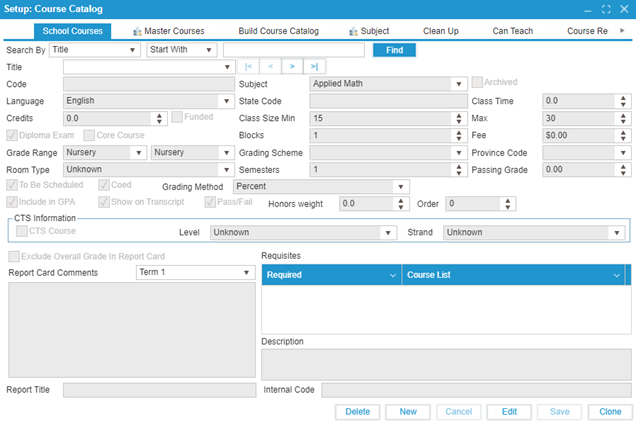
This tab is used to set up and configure courses at the school level. Classes must be configured in this interface before they appear as options in the Course dropdown in the Class, Homeroom, and CTS features. Refer to the Appendix for descriptions of each field.
¶ Fields with Secondary Effects:
- Courses are organized on the report card based on the Subject name alphabetically.
- Archived courses (using the Archived checkbox) will not appear in the ‘Class and Homeroom and CTS’ feature.
- Fee amount: The amount entered in the fee field is applied to a student’s fee account if they are enrolled in that course.
- Grade range sets which students can request that course in Course Requests.
- To Be Scheduled checkbox indicates whether the course will appear in the Schedule Builder feature.
- Include in GPA checkbox controls whether the final course grade contributes to the student’s GPA in Student: Academic.
- Show on Transcript controls whether the course information, including grades, appears on the student’s transcript.
- Exclude Overall Grade in Report Card controls whether course information appears on the student's printed PDF report card in Office: Report Card.
- Report Card Comments will appear at the bottom of Office: Report Card: Report Cards – Course for the selected term and will be printed on the PDF report card below the course title.
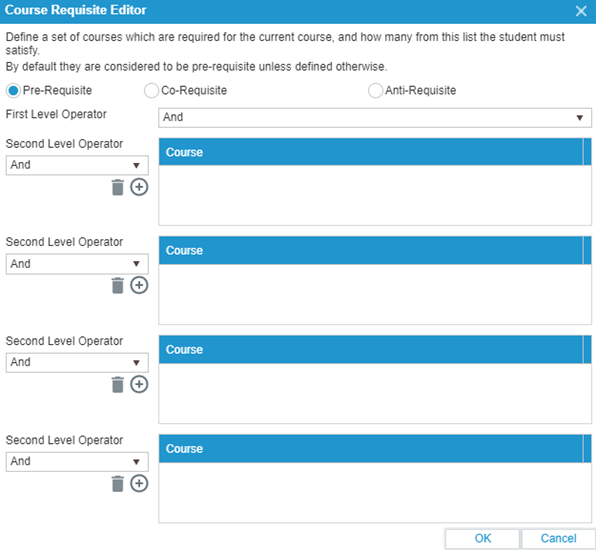
- Course Requisite Editor allows the user to add Pre-requisites, Co-requisites, and Anti-requisites for the course.
For easy editing, courses can be cloned using the Clone button on the bottom right of the screen.
¶ Description of Fields on the School Courses Tab:
- Title: Name of the course.
- Subject: Course subject, defined in the Subject tab.
- Code: Course Code.
- State Code: Course State Code.
- Class Time: Time the course is scheduled.
- Language: Language the course is taught in.
- Class Size Min: Minimum class size.
- Max: Maximum class size.
- Credits: Number of credits for the course.
- Funded: Indicates whether the course is funded by a third party.
- Blocks: Number of blocks the course will be offered in.
- Fee: Fee for the course.
- Grading Method: Predefined grading method.
- Grading Scheme: Predefined scheme to convert grades into letters, numbers, etc.
- Province Code: The province where the school offering the course is located.
- Grade Range: Grade range of students eligible to select this course.
- Room Type: Type of room required for the course.
- Semesters: Number of semesters the course is offered.
- Passing Grade: Minimum grade required to pass.
- To Be Scheduled: Indicates if the course is to be scheduled by the scheduler.
- Core Course: Specifies whether the course is core or elective.
- Coed: Whether the course is coed.
- Diploma Exam: Indicates if a diploma exam is required.
- Include in GPA: Whether the course contributes to GPA.
- Show on Transcript: Whether the course appears on the transcript.
- Pass/Fail: Indicates if the course uses a Pass/Fail grading scheme.
- Honors Weight: Grade required for honor roll status.
- Order: Order in which the course appears on the report card.
- CTS Course: Specifies if the course is a CTS course.
- CTS Level: Level of the CTS course.
- CTS Strand: Strand of the CTS course.
- Report Card Comment Size: Maximum comment length on the report card.
- Report Card Strand: Report card strand.
- Report Title: Title of the report for this course.
- Requisite: Prerequisites and corequisites for the course.
- Description: Description of the course.
- Internal Code: The internal code for the course (used in Course Requests).