¶ Setup Report Card
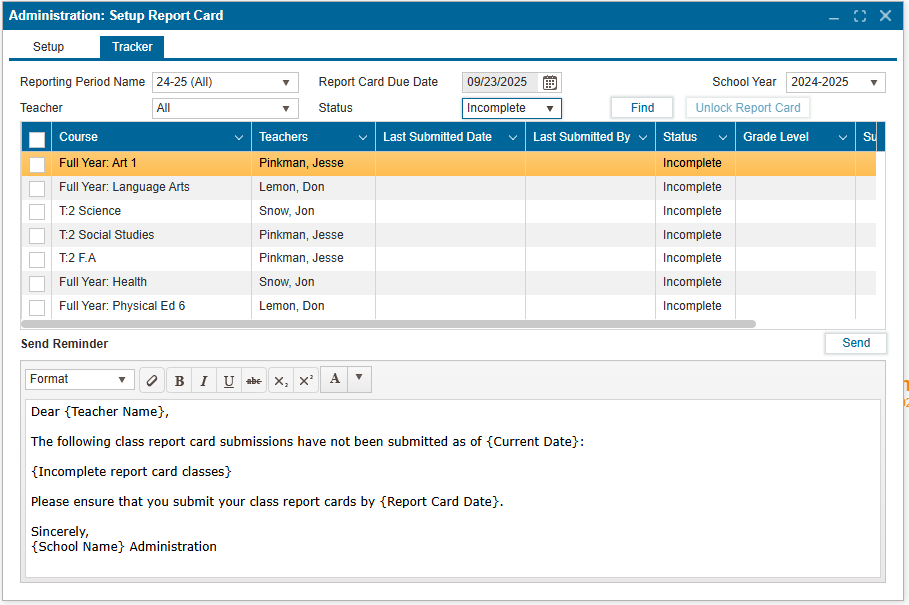
The Setup tab allows administrators to define how report cards are generated for a selected school year and term. This includes enabling/disabling features, setting messages, and preparing them for distribution.
¶ How to Set Up a New Report Card Period 📅
- Navigate to Administration >> Setup Report Card.
- Click New to start a new reporting period.
- Select the appropriate Track (e.g., Elem. 24-25).
- Set the Due Date using the calendar picker.
- Adjust the dropdown fields (e.g., Outcomes, Teacher Comments, Overall Grade) based on the report card preferences.
- (Optional) Check Subjects on New Page to print each subject on a separate page.
- (Optional) Enable Principal Message to include a message from the principal on the report card.
- Ensure the Status is set to Open to allow staff to enter data. (This is the default, but always double-check.)
- Click Save to confirm changes and apply settings.
- Repeat the same process to create other reporting periods.
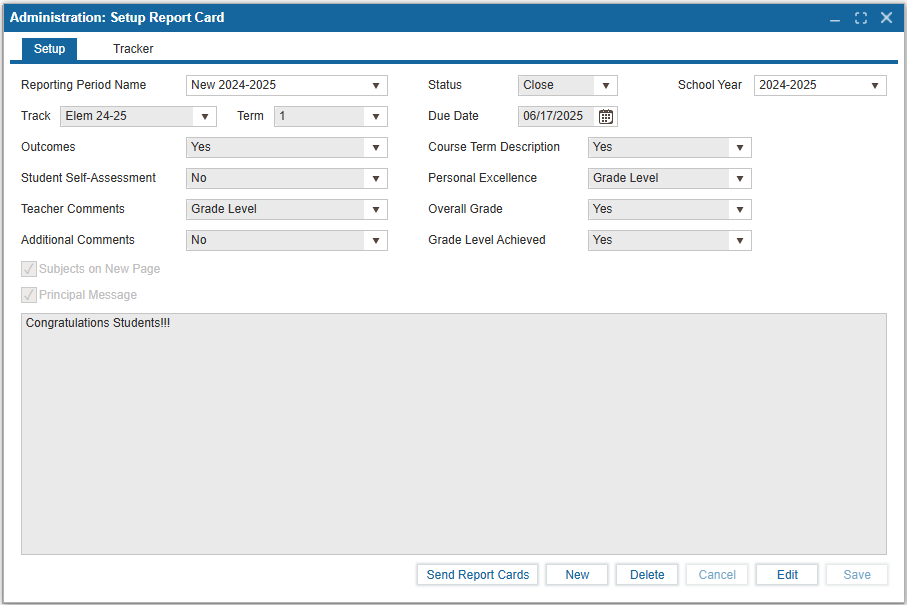
Send Report Cards button can be used to:
- 📄 Generate report cards
- 📥 Download report cards
- 📧 Send report cards to Parent’s Email
- 🌐 Send report cards to the Public Portal
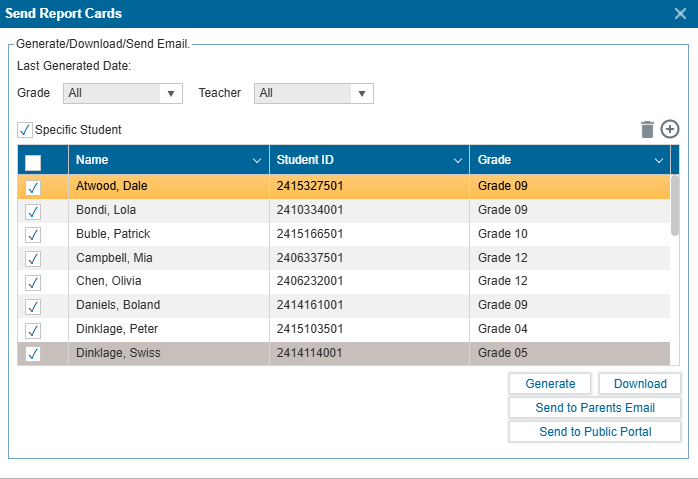
The Tracker tab provides administrators with a real-time overview of the status of all teacher-submitted and incomplete report cards during a selected reporting period.
¶ To Use this Feature:
-
Select the reporting period from the dropdown. This automatically filters the report cards based on the selected Status.
-
Click Find to populate the tracker table.
-
Filter by Teacher (Optional):
- 👥 All – Shows report cards for all teachers
- 👤 Specific Teacher – Displays only the selected teacher’s report cards
-
Status Filter:
- ⏳ Incomplete – Displays report cards that are still pending submission
- ✅ Submitted – Displays report cards that have been completed and submitted
-
Unlock Report Card 🔓:
- Once submitted, report cards are locked to prevent further changes.
- Admin can unlock a submitted report card if changes need to be made.
- Using the checkbox, select the submitted report card and click Unlock Report Card button to allow revision and resubmission of the report card.
-
Send Reminder 🔔:
This messaging system can be used to remind teachers to complete and submit their report cards:- Select the checkbox next to the teacher(s) to whom the reminder should be sent
- Once selected, click Send to deliver the reminder to the selected recipients (teachers will receive this reminder on their portal and via email)