¶ Grading Comments and Schemes
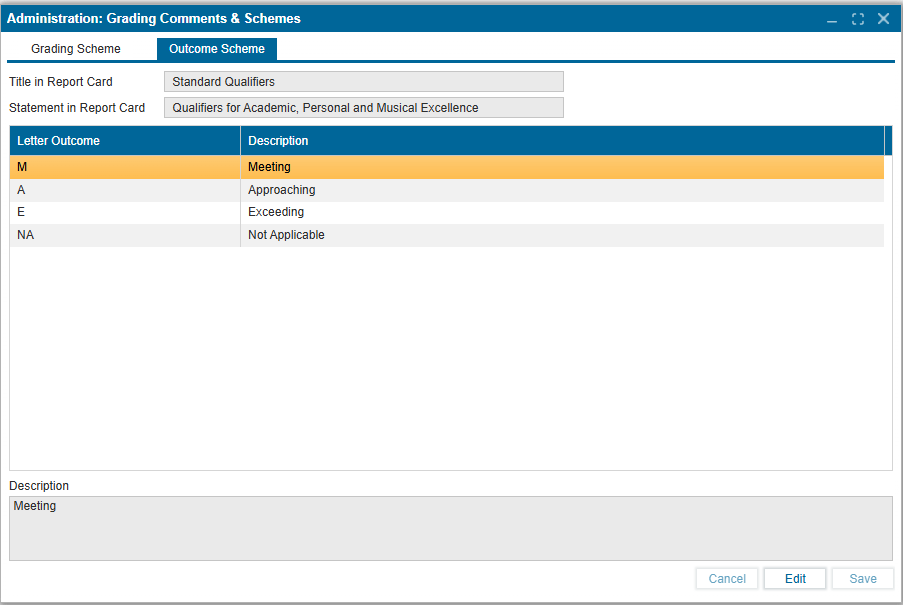
Administrators can create and define different grading schemes for the school district. Each grading scheme can be personalized by configuring Letter Grade, Mark, GPA Value and/or Description in a multitude of ways. This is a required setting to provide the system the ability to translate a student's mark into the standardized levels of achievement for features such as Initial Setup>Track Information, Course Catalog>School Courses, Report Card and Grading.
¶ To Create a New Grading Scheme:
- Navigate to: Administration > Grading Comments & Schemes.
- Select the Grading Scheme tab.
- Click New.
- Enter a name for the new grading scheme in the Grading Scheme field and click OK.
- In the Title in Report Card field, enter the heading that will appear on the report card (e.g., Overall Assessment Rubric).
- In the Statement in Report Card field, enter the statement to display in the report card (e.g., Achievement and Personal Excellence).
- For each grade range, enter:
- Minimum Mark – The lowest mark required for the grade.
- Letter Grade – The letter representation of the grade (e.g., B, A+, C+).
- GPA – The numeric GPA value for the grade.
- Description – A short descriptor for the grade (e.g., Proficient, Excellent, Exceptional).
- Repeat Step 7 for all grading ranges required.
- Click Save to apply and confirm changes.
- Use the Delete button to remove an existing grading scheme.
- The Grading Schemes do import from the last school year, ensuring users have the option to Edit or remove the grading scheme(s) available.
Note:
- A grading scheme can be assigned to a track or to each course individually.
- When assigned, the system will automatically convert a student’s mark into the corresponding letter grade, GPA, and description according to the defined scheme.
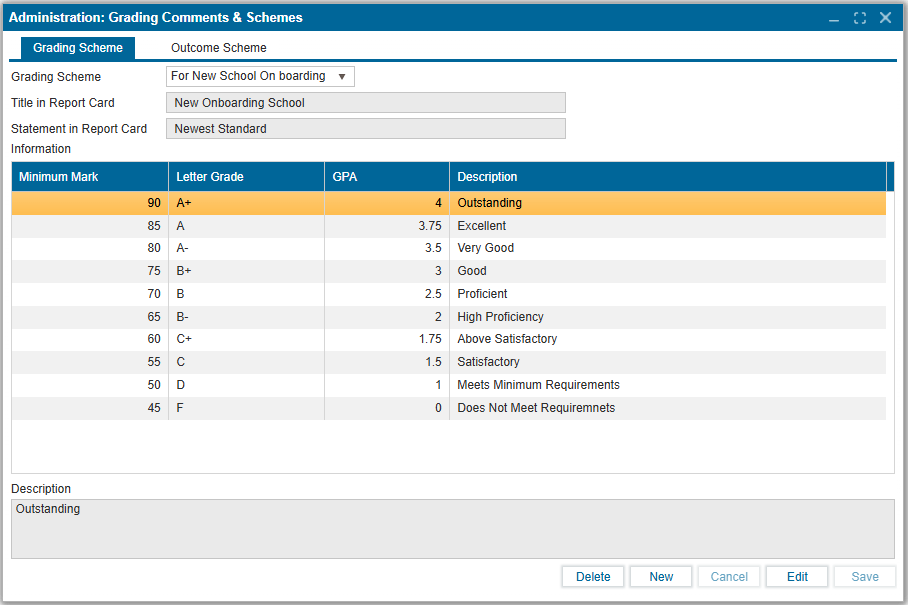
Administrators can define outcome schemes that translate outcome ratings into standard letter outcomes with descriptions. These schemes can be linked to report cards to ensure consistent outcome evaluation.
¶ To Create or Edit an Outcome Scheme
- Navigate to Administration > Grading Comments & Schemes.
- Select the Outcome Scheme tab.
- In the Title in Report Card field, enter the heading to display on the report card
e.g., Standard Qualifiers. - In the Statement in Report Card field, enter the statement to display below the title
e.g., Qualifiers for Academic, Personal, and Musical Excellence. - Click Edit.
- For each outcome, enter:
- Letter Outcome – The short code for the outcome e.g., M, A, E, NA.
- Description – The full description of the outcome e.g., Meeting, Approaching, Exceeding, Not Applicable.
- Repeat Step 6 for all required outcomes.
- Click Save to apply changes.
Note:
Outcome schemes allow schools to standardize how student outcomes are presented on report cards, ensuring clear and consistent communication across subjects and grades.