¶ Class Builder
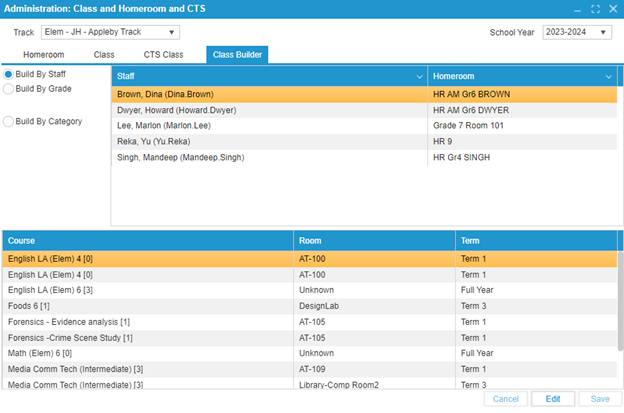
The Class Builder tab is intended to help administrative users create classes more easily. There are three main modes:
-
Build By Staff – Add classes that are being taught by each teacher. This mode is helpful to ensure that teachers are not given too many courses.
- To add a class to a teacher: click Edit, select the desired teacher in the top table, and then click the plus button above the bottom table.
-
Build By Grade – Add classes to the schedule based on the grade.
- The dropdown on the left filters the courses based on the grade for which they are offered.
- To add a class: click Edit, select the desired teacher in the top table using the checkbox, and then select the desired class(es) in the bottom table using the checkboxes. Clicking Save will add the classes.
-
Build By Category – Add classes to the schedule based on their subject.
- Select a course in the dropdown, and the bottom table will display all classes with the same subject.
- To add a class: click Edit, select the desired teacher in the top table using the checkbox, and then select the desired class(es) in the bottom table using the checkboxes. Clicking Save will add the classes.